7 fixes when ZonitasCap doesn’t Work
You downloaded ZonitasCap. You followed the steps. And now something is broken.
Either the app will not install, it crashes the moment you open it, or the features simply refuse to activate inside the game.
Whatever the specific problem, the frustration is identical: you came here to play better, not to debug an APK at midnight.
The good news is that every common ZonitasCap error has a fix. Here are the seven that actually work, in order of how frequently each problem occurs.
Fix 1: “App Not Installed” Error
This is the most common ZonitasCap error by a significant margin.
The “App Not Installed” message almost always means one of two things: Unknown Sources is not properly enabled, or you have insufficient storage space.
For Unknown Sources: go to Settings, then Security or Privacy depending on your Android version, and look for “Install apps from unknown sources” or “Allow from this source.”
On Android 8.0 and above, this setting is app-specific, meaning you need to enable it for the specific browser or file manager you used to download the APK, not just globally.
This is the step most people miss.
For storage: ZonitasCap needs approximately 100 MB of free space to install cleanly. Check your available storage and clear space if needed before attempting reinstallation.
Fix 2: App Crashes on Launch
If ZonitasCap opens and immediately closes, the most likely cause is either a corrupted download or a conflicting cached file from a previous installation attempt.
Start by clearing the cache: go to Settings, then Apps, find ZonitasCap, and tap Clear Cache.
If that does not resolve it, fully uninstall ZonitasCap, restart your phone, then download a fresh APK file and reinstall.
A corrupted download, which can happen when your internet connection drops mid-download, is the single most common cause of launch crashes and reinstalling from a fresh file fixes it almost every time.
Fix 3: Features Not Activating in Game
ZonitasCap needs to run in the background while your game is open.
If features are not activating, your Android device is likely killing ZonitasCap’s background process to free up RAM.
Go to Settings, then Apps, find ZonitasCap, and look for Battery or Background Activity settings.
Enable “Allow background activity” or disable battery optimisation for ZonitasCap specifically.
On some Samsung and Xiaomi devices, there is also a separate “Auto-launch” permission that needs to be enabled for apps to maintain background processes reliably.
Fix 4: Download Link Not Working
If the download fails or the link appears broken, the fix is almost always a browser cache issue.
Clear your current browser’s cache, switch to a different browser, Chrome, Firefox, or Opera all work well, and try the download again.
If you are on mobile data, switch to Wi-Fi for the download.
Large APK files occasionally fail mid-download on unstable mobile connections, and the resulting partial file will not install.
Fix 5: Compatibility Warning
ZonitasCap requires Android 5.0 (Lollipop) or higher.
If you see a compatibility error, your device is running an older Android version.
Check your current version by going to Settings, then About Phone, then Android Version.
If your device supports an Android update that would bring it to 5.0 or above, apply that update.
If your device’s maximum supported Android version is below 5.0, ZonitasCap will not run on that hardware regardless of other fixes.
Fix 6: Antivirus Blocking the Installation
Many mobile antivirus applications, including pre-installed security apps on Samsung, Xiaomi, and Huawei devices, automatically block APK installations from outside the Play Store.
This is a blanket security policy, not a specific detection of ZonitasCap.
Temporarily disable your antivirus or device security app before installing ZonitasCap.
Once the installation completes successfully, re-enable your security app.
The installed version of ZonitasCap will not be affected.
Fix 7: Game Features Work but Account Got Flagged
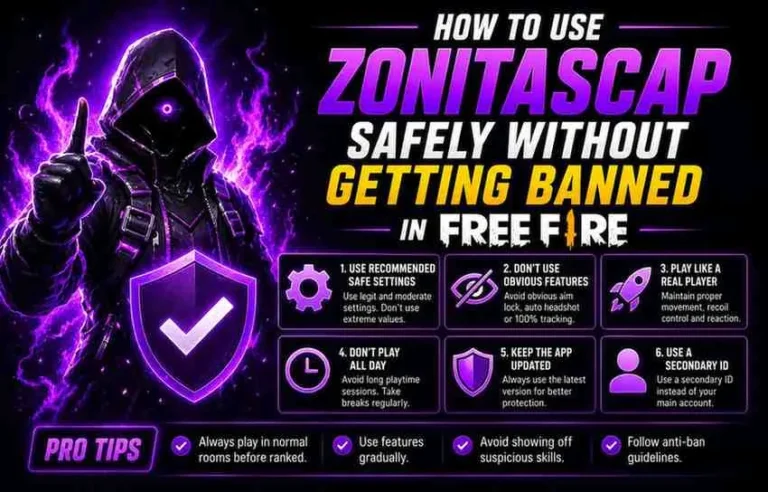
If ZonitasCap installs and runs correctly but you notice unusual behaviour in-game, sudden sensitivity changes reverting, features deactivating mid-match, or warnings appearing in your game, you are almost certainly running an outdated version of ZonitasCap that no longer aligns with the current game patch. Is ZonitasCap safe for your account ?
Check for the latest version and update immediately.
Running an outdated injector against a patched game is the most common cause of detection-related issues.
The ZonitasCap update cycle is specifically designed to stay current with Free Fire and COD Mobile patches but only if you are running the latest version. How to use ZonitasCap safely without getting banned