How to Use ZonitasCap Safely Without Getting Banned in Free Fire
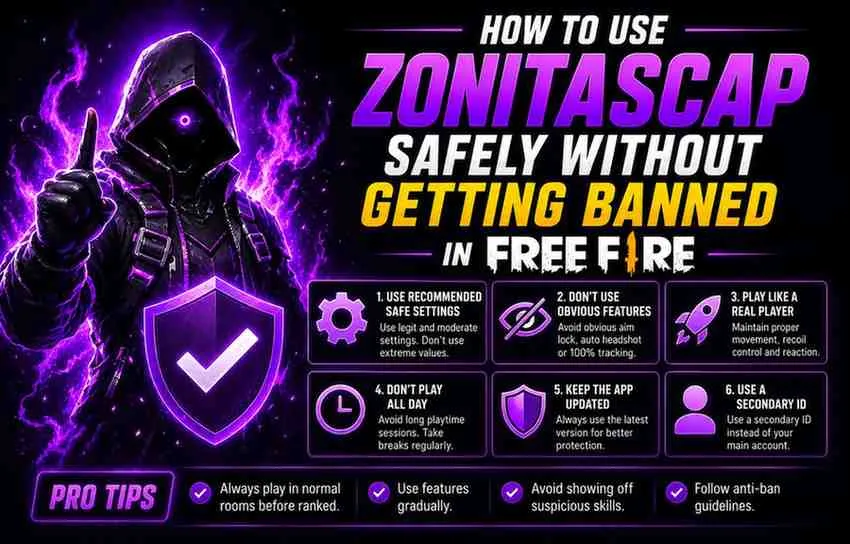
Let me tell you about the most common way Free Fire players lose their account when using ZonitasCap. It is not because the app is unsafe. It is because they do one specific thing that immediately raises a red flag with Garena’s anti-cheat system, and most of them do not even realise they did it. They turned Safe Mode off. That one decision, made because someone on YouTube said it “unlocks the full power” of the app, is responsible for a disproportionate number of ban reports. Understanding exactly why that happens, and building smart habits around it, is what this post is actually about.
Understand What Garena’s Anti-Cheat Actually Looks For
Knowing your enemy is the first step. Garena’s anti-cheat system for Free Fire does not watch every player constantly.
It uses statistical anomaly detection. It flags accounts whose performance data falls outside statistically plausible ranges for their ranked tier.
A Bronze-tier player who suddenly achieves 94% headshot accuracy across 20 consecutive matches is statistically impossible without assistance. That triggers a review.
A Diamond-tier player using ZonitasCap’s sensitivity refinements with a 58% headshot rate? That is within the normal performance range for their skill bracket. That does not trigger anything.
This is the principle your entire ZonitasCap usage strategy should be built around. Stay within the statistical range of your actual skill level. Enhance your performance, but do not replace it entirely.
Rule 1: Always Keep Safe Mode Enabled
ZonitasCap’s Safe Mode is not optional if account security matters to you. Safe Mode limits the intensity of certain features, particularly aimbot, to levels that keep your performance statistics within plausible ranges. Turning it off allows features to run at maximum intensity, which produces the kind of impossibly precise performance data that anti-cheat systems are specifically designed to detect.
Keep Safe Mode on. Every session. No exceptions.
Rule 2: Test on a Secondary Account First
Before using any ZonitasCap feature on your main account, spend a week testing it on a secondary account. Create a fresh Free Fire account, install ZonitasCap, activate the features you want to use, and play 15 to 20 matches. If no issues arise, you have reasonable confidence that those specific features, at those specific settings, are safe to use. This approach costs you nothing except a small amount of time. It gives you genuine data about how those features perform before you risk an account you have invested months or years building.
Rule 3: Avoid Using ZonitasCap During Ranked Season Peaks and Major Events
Garena intensifies anti-cheat monitoring during ranked season climbs, especially in the final two weeks of a season when players push aggressively for tier upgrades. They also run heightened detection during major live events and esports tournaments. These are the highest-risk periods for third-party tool detection. During these periods, use ZonitasCap exclusively for the lower-risk features, sensitivity calibration, FPS optimisation, and resource tools. Save the combat-focused features for regular unranked matches and casual modes where detection activity is lower.
Rule 4: Keep ZonitasCap Updated
Every time Free Fire releases a major patch, Garena also updates its anti-cheat signatures. An outdated version of ZonitasCap may interact with the patched game in ways that the ZonitasCap developers have since corrected. Always check for updates after major Free Fire patches and install them promptly. Running an outdated injector against a patched game is the most common cause of detection-related issues. ZonitasCap not working? Here are the fixes
Rule 5: Do Not Brag About It
This one sounds obvious. It apparently is not, because it happens constantly. Players who get banned for using ZonitasCap in Free Fire are often caught not by automated systems but by player reports. Players report accounts they suspect are cheating. Reported accounts receive manual reviews. Manual reviews catch things automated systems sometimes miss. If you are using ZonitasCap, play well but play within the believable range of your skill level. Do not post gameplay clips showing statistically impossible performance. Do not tell your squad. Keep it private and keep it sensible.
Rule 6: Never Enter Your Main Account Login Anywhere
ZonitasCap does not ask for your Free Fire login. Ever. If any version of ZonitasCap prompts you for your account credentials, you have downloaded a fake. Uninstall it immediately and download only from the verified source. Your account credentials should never be required for ZonitasCap to function. Is ZonitasCap safe to download; Find out here